Introduction
In today’s workplace, employees often use numerous tools to communicate, share documents, manage projects, and access company information. While these platforms can improve productivity, having too many disconnected systems can create a different problem: employees may struggle to find the information they need.
This is where company intranet software can make a significant difference.
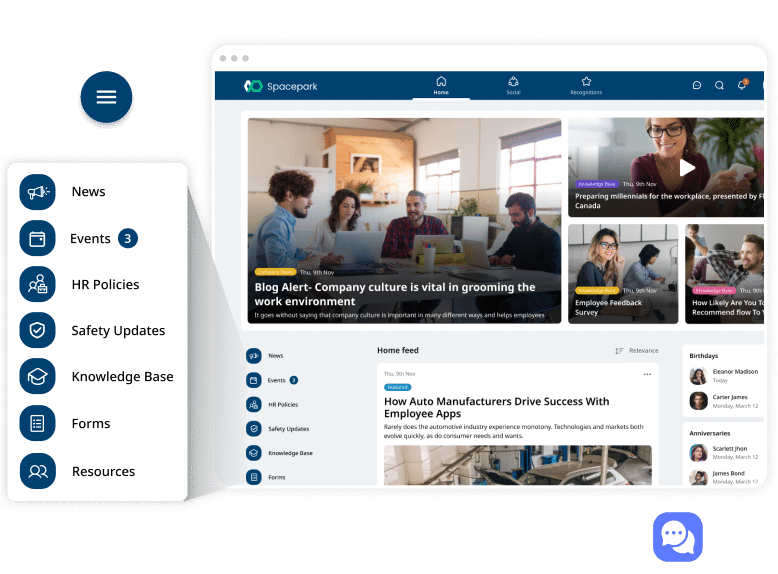
A modern intranet provides a centralized digital workplace where employees can access important resources, communicate with colleagues, discover company news, share knowledge, and stay connected with organizational goals. Unlike traditional intranets that were mainly used as digital notice boards, today’s solutions can support collaboration, employee engagement, document management, internal communication, and personalized employee experiences.
For businesses of different sizes, choosing the right intranet platform can help reduce information silos and make everyday work more organized. However, successful implementation requires more than simply purchasing software. Companies need to understand their objectives, employee needs, security requirements, integrations, and long-term strategy.
This guide explains what company intranet software is, its key features, benefits, challenges, and how to choose the right solution.
What Is Company Intranet Software?
Company intranet software is a private digital platform designed for communication, collaboration, information sharing, and employee engagement within an organization.
Unlike a public website, an intranet is intended for authorized employees and other approved users. It can serve as a central destination for company information and workplace resources.
Depending on the software, employees may use an intranet to:
- Read company announcements
- Find employee directories
- Access policies and procedures
- Search internal documents
- Share knowledge
- Communicate with teams
- View organizational updates
- Access workplace resources
- Find important forms and tools
- Recognize employee achievements
Modern intranets can also integrate with other business applications, creating a more connected digital workplace.
Traditional Intranet vs. Modern Intranet
Older intranet systems were often static and difficult to navigate. Employees might have used them primarily to access policies, forms, or basic company announcements.
Modern intranets are much more interactive.
They can include personalized dashboards, advanced search, social features, mobile access, integrations, analytics, employee communities, and automated content management.
The goal is no longer simply to store information. Instead, the goal is to make useful information easier to discover and workplace communication more effective.
Why Do Businesses Need an Intranet?
As organizations grow, communication becomes more complicated.
Employees may work across different departments, offices, time zones, or even countries. Important information can become scattered across email conversations, messaging applications, shared drives, project-management platforms, and individual documents.
A company intranet can provide a centralized layer connecting these resources.
Reducing Information Silos
Information silos occur when important knowledge exists within separate teams or systems.
For example, the human resources department may maintain one collection of documents while the IT department uses another system. Employees may not know where to find the information they need.
A well-designed intranet creates a more consistent information environment.
Supporting Hybrid and Remote Work
Remote and hybrid teams often need reliable access to company information regardless of location.
An intranet can provide a shared digital workplace where employees can access announcements, resources, directories, policies, and organizational knowledge without being physically present in an office.
Key Features of Company Intranet Software
The features available vary between platforms, but several capabilities are particularly useful.
Employee Directory
An employee directory allows workers to find colleagues quickly.
A useful directory may include:
- Name
- Job title
- Department
- Location
- Contact information
- Skills
- Reporting relationships
This can make it easier for employees to identify the right person for a question or project.
Why Employee Profiles Matter
Employee profiles can do more than provide contact information. They can help people discover colleagues with specific skills, experience, or responsibilities.
This is especially valuable in large organizations where employees may not know everyone personally.
Internal Communication
Internal communication is one of the most important functions of an intranet.
Organizations can use an intranet to publish:
- Company announcements
- Leadership messages
- Department updates
- Policy changes
- Event information
- Organizational news
Centralized communication reduces the likelihood that important information becomes buried in individual email inboxes.
Document Management
Employees frequently need access to policies, templates, presentations, procedures, and other documents.
Intranet software can provide a structured environment for organizing these resources.
Document Search
Search functionality is especially important.
Employees should be able to find relevant information without navigating through dozens of folders.
A strong search system can save time and reduce frustration.
Knowledge Management
Organizations contain valuable knowledge that may not exist in formal documents.
Employees gain experience by solving problems, completing projects, and working with customers. A modern intranet can help capture and distribute some of that knowledge.
Knowledge-sharing features can include:
- Internal articles
- FAQs
- Guides
- Wikis
- Best practices
- Community discussions
Employee Recognition
Some intranet platforms include social or recognition features that allow employees and managers to celebrate achievements.
Recognition can highlight milestones, successful projects, work anniversaries, or contributions to company initiatives.
When used appropriately, these features can support a stronger sense of community.
Benefits of Company Intranet Software
Implementing the right intranet can provide benefits across multiple areas of an organization.
1. Better Internal Communication
Employees have a central place to find official company announcements and updates.
This can make communication more consistent and reduce dependence on informal information channels.
2. Improved Productivity
Employees can spend less time searching for documents, contact details, and organizational information.
Even small reductions in information-search time can become significant when multiplied across a large workforce.
3. Stronger Employee Engagement
An intranet can give employees more opportunities to participate in company communication and communities.
Interactive features can make employees feel more connected to their colleagues and organization.
4. Easier Knowledge Sharing
Instead of keeping valuable information inside individual departments, organizations can create a more accessible knowledge environment.
This can be especially useful when experienced employees leave the company.
5. Better Onboarding
New employees often need to learn a large amount of information during their first few weeks.
An intranet can provide a centralized onboarding destination containing:
- Company policies
- Employee handbooks
- Training resources
- Organizational information
- Frequently asked questions
- Department resources
This can make the onboarding process more consistent.
How to Choose the Right Company Intranet Software
Choosing an intranet platform requires careful consideration.
Identify Your Business Goals
Start by asking what you want the intranet to accomplish.
For example, your primary objective might be:
- Improving internal communication
- Centralizing company information
- Supporting remote employees
- Improving knowledge management
- Strengthening employee engagement
- Simplifying onboarding
Clear goals make it easier to evaluate potential solutions.
Consider User Experience
An intranet can have dozens of powerful features, but employees will not benefit from them if the platform is difficult to use.
Look for an intuitive interface, straightforward navigation, useful search functionality, and clear content organization.
Mobile Accessibility
Employees increasingly expect workplace tools to work on smartphones and tablets.
If your workforce is distributed or frequently mobile, responsive design or a dedicated mobile experience may be particularly important.
Check Integration Options
Businesses already use many digital tools.
Your intranet should ideally work alongside the applications your employees already rely on.
Depending on your environment, useful integrations may include:
- Productivity suites
- Communication platforms
- HR systems
- Identity providers
- Project-management tools
- Cloud storage
- Calendar applications
Integrations can help prevent the intranet from becoming another isolated system.
Evaluate Security
Because an intranet can contain sensitive company information, security should be a major consideration.
Look for features such as:
- Role-based access
- Authentication controls
- Permission management
- Encryption
- Audit capabilities
- Secure administration
- Compliance support
The appropriate security requirements will depend on the organization’s industry, location, and regulatory obligations.
How to Successfully Implement an Intranet
Buying software is only one part of the process.
Involve Employees Early
Employees should have an opportunity to provide input before implementation.
Ask them:
- What information is difficult to find?
- Which communication problems do they experience?
- What tools do they use most frequently?
- What would make their daily work easier?
Their answers can influence the platform’s structure and priorities.
Create Clear Content Ownership
An intranet can quickly become outdated if nobody is responsible for maintaining its content.
Assign ownership to appropriate departments or individuals.
For example, HR can manage employee policies while IT manages technical resources.
Keep Navigation Simple
Avoid creating complicated menus with too many categories.
Organize information according to how employees actually search for it rather than how the company’s internal departments are structured.
Promote the Platform
Employees need a reason to use the intranet.
Promote it through onboarding, internal communications, training sessions, and leadership support.
If important information consistently appears there first, employees are more likely to develop the habit of checking it.
Common Intranet Mistakes to Avoid
Even good software can fail when implementation is poorly planned.
Treating the Intranet as a Digital Filing Cabinet
An intranet should be more than a storage location.
Use it to connect people, information, communication, and workplace resources.
Publishing Too Much Content
More information does not necessarily mean better information.
Remove outdated pages and avoid unnecessary duplication.
Ignoring Search
If employees cannot quickly find information, they may return to email or other unofficial channels.
Invest time in content organization, naming conventions, metadata, and search functionality.
Failing to Measure Usage
Organizations should monitor how employees use the intranet.
Useful metrics may include:
- Active users
- Search activity
- Most visited pages
- Content engagement
- Employee participation
- Frequently searched terms
These insights can reveal areas that need improvement.
The Future of Company Intranet Software
Intranets continue to evolve as workplace technology changes.
Artificial intelligence, improved search, personalization, automation, and collaboration features are increasingly influencing digital workplace platforms.
AI-Powered Search and Assistance
AI can potentially help employees find information more naturally.
Instead of searching for an exact document title, employees may be able to ask a question and receive relevant information from approved internal sources.
Personalized Employee Experiences
Future intranets are likely to become more personalized.
Employees may see information based on their department, location, role, interests, or responsibilities.
This can reduce information overload by showing people what is most relevant to them.
Greater Integration
The modern intranet is increasingly becoming a gateway to other workplace systems rather than a standalone destination.
Employees may use one interface to discover information while accessing specialized applications through integrated services.
Frequently Asked Questions
1. What is company intranet software?
Company intranet software is a private digital platform used by organizations to connect employees, share information, manage internal content, support communication, and improve workplace collaboration.
2. What are the main benefits of an employee intranet?
Major benefits include improved communication, easier information discovery, better knowledge sharing, stronger employee engagement, simplified onboarding, and increased workplace productivity.
3. Is intranet software useful for small businesses?
Yes. Small businesses can benefit from centralized communication, employee directories, document management, knowledge sharing, and onboarding resources. The key is selecting a platform that matches the organization’s size and needs.
4. What features should modern intranet software include?
Important features can include employee profiles, internal news, document management, search, knowledge bases, integrations, mobile accessibility, permissions, analytics, and collaboration tools.
5. How can a company encourage employees to use its intranet?
Make the platform easy to navigate, publish useful information consistently, involve employees in its development, provide training, and ensure leadership actively supports its use.
Conclusion
Company intranet software has evolved from a simple internal website into a central component of the modern digital workplace. When implemented correctly, it can bring communication, knowledge, people, documents, and workplace resources together in one accessible environment.
The biggest advantage is not simply having another software platform. It is creating a reliable place where employees can find the information they need and stay connected with the organization.
Businesses considering an intranet should begin by identifying their most important communication and collaboration challenges. From there, they can evaluate usability, search, integrations, security, mobile access, content management, and scalability.
Successful implementation also requires employee involvement and ongoing content management. An intranet that is easy to use, regularly updated, and genuinely useful is far more likely to become part of employees’ everyday workflow.
As organizations continue embracing hybrid work, AI-powered search, personalization, and integrated digital workplaces, the role of the intranet is likely to become even more important. Choosing the right platform today can help businesses build a more connected, informed, and productive workforce for the future.